Page 6 of 7
Re: 3D capturing
Posted: Sat May 25, 2013 8:45 pm
by VideogameScrapbook
loopy wrote:VideogameScrapbook wrote:* Virtual Console 1:1 modes, such as for Game Boy
I guess I'll have to get some Virtual Console games, I don't know what these look like. Do they all use the same screen layout?
VideogameScrapbook wrote:* A full screen option that does not have title bars
Double click in the middle of a window.
I tested 1:1 orientation using a piece of Scotch tape as reference for opposite corner locations:
* Game Boy, Game Boy Color, and Game Gear screen size and placement match identically since they are same resolution and Sega seemed to be consistent with screen placement.
* NES has no scaling options and takes up full height, but DS (upscaled) mode seems to work fine for full screen. However, it doesn't seem to be pixel perfect, which I think might be the fault of the 3DS and you wouldn't be able to do anything about it.
Thank you for that hidden feature of full screen and the right-click menu with scaling type. Point scaling looks a lot better in my opinion for low resolution sprites.
Re: 3D capturing
Posted: Sun May 26, 2013 10:11 pm
by MKGirlism
Let me help you a bit:

Gameboy without Border.

Gameboy with Border.

Gameboy Colour without Border.

Gameboy Colour with Border.

Game Gear.

Gameboy Advance (Ambassador-only).

NES.
Re: 3D capturing
Posted: Mon May 27, 2013 1:37 am
by VideogameScrapbook
MKGirlism wrote:Let me help you a bit:
Game Gear.
There are two other Game Gear modes. One is 1:1 (with border) that matches placement of Game Boy. The other I believe is Fill Screen.
Re: 3D capturing
Posted: Mon May 27, 2013 6:39 am
by MKGirlism
I didn't know that one.
I should play Game Gear VC's more often then.
Re: 3D capturing
Posted: Mon May 27, 2013 5:59 pm
by VideogameScrapbook
Here are some images to add to those already prortrayed above.
All images with 3D turned off. I noticed the 1:1 mode pixel locations can sometimes vary by 1 pixel when 3D is on.
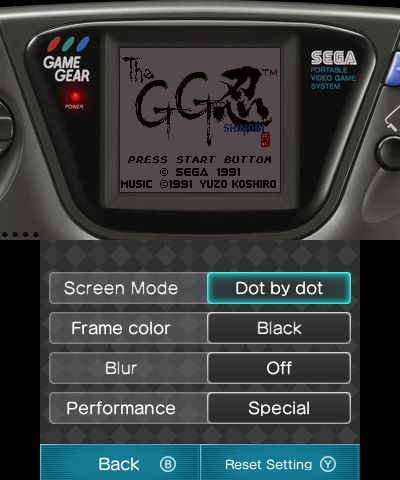
- 00002.png (135.13 KiB) Viewed 4630 times
Game Gear (1:1)
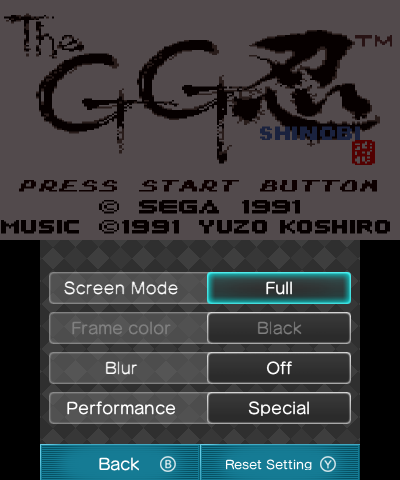
- 00003.png (40.22 KiB) Viewed 4630 times
Game Gear (stretched)
The other mode that was already depicted in a previous post is known as "Normal" in the options.
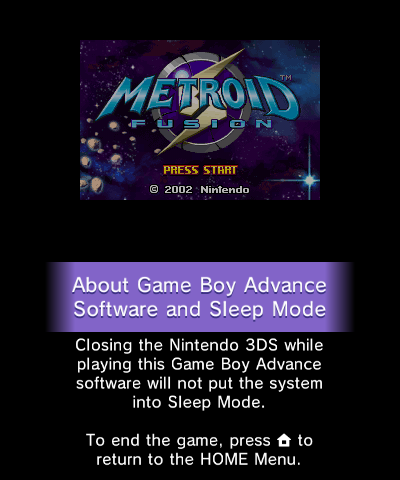
- 00004.png (79.46 KiB) Viewed 4630 times
Game Boy Advance (1:1)
Re: 3D capturing
Posted: Thu Jun 06, 2013 10:01 am
by Rayquaza3010
When will you release the next software version for the capture board on the main page, Loopy?
Re: 3D capturing
Posted: Thu Jun 06, 2013 2:17 pm
by mike123
I hope audio over USB comes out before Pokemon X and Y

Re: 3D capturing
Posted: Wed Jun 12, 2013 10:56 am
by Greenalink
I was skim reading the thread and downloaded the first 3DS Capture beta, then I was installing the update and the worst case scenario happen. It got disconnected during the update procedure by accident and now I can't get my 3DS capture to work on any version at all.
Is there any way to fix this problem like a version downgrader or re installing the driver files?
Edit:
To tell you how bad it is: The operating system doesn't update the list on the device manager and it lacks the USB Connected/Disconnected sound effect. My DS original capture device works fine so it's not my USB but it looks like the capture card itself is buggered up by disconnecting the USB during the update on the driver.
Edit 2:
After turning the 3DS off, if the usb cable is still connected. You can't turn the power on, you need to take out the USB first and then you can actually power it up.
Re: 3D capturing
Posted: Wed Jun 12, 2013 4:16 pm
by loopy
Unless you have a JTAG programmer, you can't fix it yourself. Since you are outside the US, the easiest thing to do would be a board swap so you don't have to send your 3DS back.
Re: 3D capturing
Posted: Sat Jun 15, 2013 7:56 pm
by Greenalink
I am trying to take out the board right now but I am really concerned about the orange ribbon cable connected to the capture board. How do I take it out without damage?