Page 1 of 1
Issues with OBS (or possibly my webcam)
Posted: Sun Sep 21, 2014 12:39 am
by Kuari
Decided to make a new topic for this new issue since it's unrelated to my previous one.
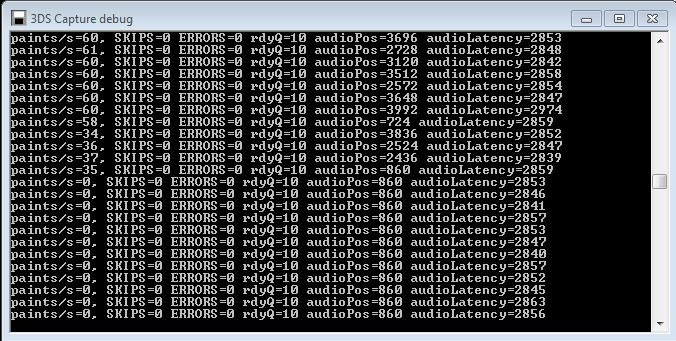
After a bit of running it in OBS the screen on the program seems to freeze, no audio, video freezes with this in the results of the debug when it happens:
- Screenshot_2.png (30.62 KiB) Viewed 5173 times
I've been messing with it for a good while now, trying different load orders and the like until I noticed something a bit odd. When I turned off my webcam it'd try to start up again. I toggled it on and off repeatedly and tried toggling other things but only the webcam did it consistently do this.
Right now I'm trying it with my webcam off and leaving OBS running in preview mode to see if it keeps running for a long period, but I sort of would like to keep my webcam for broadcasting. It's a Logitech C510 HD Webcam. If this is the problem, is there a good workaround? Maybe a webcam that isn't overly expensive I can get instead that is known to work with it or maybe a non-logitech cam program I can use to work with it? Or is it likely an odd coincidence and something with OBS? Maybe some trick where they won't interfere with each other?
I'll let you know in about an hour if my current test run shows results on if it really is related to the camera or not.
Re: Issues with OBS (or possibly my webcam)
Posted: Sun Sep 21, 2014 1:06 am
by Kuari
Seems it IS the webcam... OBS was working solid... decided to test something my brother suggested and have my webcam and 3DS plugged into opposite sides. What's REALLY strange is disconnecting my webcam made the 3DS capture stop working. Nor does it work again plugged into the opposite side. Works though when I plug it back into the back. Webcam works either way.
EDIT: OK, UNPLUGGING the webcam in itself makes it stop working. If I leave it unplugged and unplug and replug the 3DS it works fine. Both plugged into opposite sides and the 3DS capture refuses to work entirely.
FURTHER EDIT: Tracked down another similar issue...
https://obsproject.com/forum/threads/ob ... hing.9810/
Apparently he had a logitech webcam too. No solution there.
ANOTHER EDIT: Seems to be working great plugged in next to each other... I'll let you know, but that's very strange and if there is an answer to why, I'd like to know.
Re: Issues with OBS (or possibly my webcam)
Posted: Sun Sep 21, 2014 1:47 am
by loopy
Hmm. Looking at that other thread, it sounds like the webcam software is doing something screwy. No idea what it might be, though.
Re: Issues with OBS (or possibly my webcam)
Posted: Sun Sep 21, 2014 2:00 am
by Kuari
Well it froze again, so that "fix" didn't work either like it was looking to.
But yeah, if it's likely the webcam software, I suppose I can look for a way to replace the software if that's possible
Re: Issues with OBS (or possibly my webcam)
Posted: Sun Sep 21, 2014 4:28 am
by Kuari
Well, if its the software, it's the software built into the camera... uninstalled all the components that aren't necessary so it's seeming like the two are coming into some sort of conflict. There anything I can do with the capture software that might be able to fix that kind of issue?
EDIT: Looks like a clean install of the webcam software and drivers might have done it.
Re: Issues with OBS (or possibly my webcam)
Posted: Mon Sep 22, 2014 7:40 pm
by Kuari
Nope, didn't fix it.... I have no idea what else to try. Apparently others with Logitech cams aren't having issues.
Re: Issues with OBS (or possibly my webcam)
Posted: Mon Sep 22, 2014 9:15 pm
by LVNeptune
fwiw, I could never get OBS working even with my elGato capture card. I always had some problems with it. Ended up getting Xsplit instead.
Re: Issues with OBS (or possibly my webcam)
Posted: Mon Sep 22, 2014 9:50 pm
by desocietas
We use an El Gato with OBS and it's fine. I'm able to use the regular DS capture software with several different Logitech cams, and it's been fine. But I don't make a habit of plugging/unplugging them a lot.
Re: Issues with OBS (or possibly my webcam)
Posted: Tue Sep 23, 2014 6:12 pm
by Kuari
I think I managed to fix it finally last night... apparently most of my 2.0 USB slots are linked in some way or something and the signals from the cams and the capture card interfere with each other. Ended up plugging my webcam into a 3.0 slot and it has been working great. Other than a brief stutter now when resizing windows, but that's just a minor issue.
Re: Issues with OBS (or possibly my webcam)
Posted: Tue Sep 23, 2014 7:09 pm
by LVNeptune
I was about to reply and say switch the USB bus to a different one (there's usually at least 2 per PC). After actually understanding what I'm looking at due to the log it looked like the camera + streaming traffic was just flipping that specific USB bus out. (I realize USB bus is redundant it's just easier)