Page 1 of 2
DS Capture Card Audio Question
Posted: Tue Oct 22, 2019 10:47 pm
by AeroTheManiac
Hello everyone,
I apologize if you've heard this question before. I've done some searching, both in the FAQ's recommended Audio issue thread, and some more recent posts as well.
Current DSCapture app setup:
http://prntscr.com/pmt48u
Current setup IRL:
http://prntscr.com/pmt4bu
Current Sound Settings on my PC:
http://prntscr.com/pmt4pv
Still not getting any audio recorded in the app. Any insight?
Re: DS Capture Card Audio Question
Posted: Tue Oct 22, 2019 11:56 pm
by loopy
Check your recording volume levels.
Do you hear the DS on your PC? (live, not recorded)
Re: DS Capture Card Audio Question
Posted: Wed Oct 23, 2019 12:13 am
by AeroTheManiac
No I don't. On this window, the equalizer isn't moving.
http://prntscr.com/pmtors
Re: DS Capture Card Audio Question
Posted: Wed Oct 30, 2019 6:36 pm
by loopy
I don't know. It looks like your settings are ok. Cable problem, maybe? Is it plugged into the right port? Mic level is turned up?
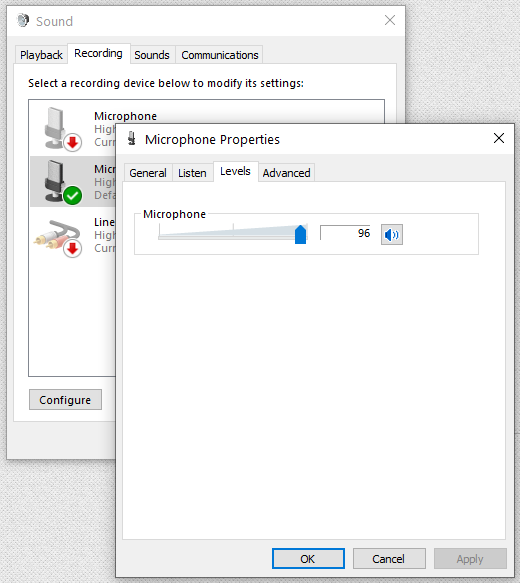
Re: DS Capture Card Audio Question
Posted: Sat Aug 15, 2020 10:55 pm
by AeroTheManiac
-Bump-
So after a year of pretty much just dealing with it, I really need the audio now. Here’s a video of the full setup (3.5 minute video)
https://youtu.be/W0ZXzDMQ78E
Re: DS Capture Card Audio Question
Posted: Tue Aug 18, 2020 12:59 pm
by AeroTheManiac
Don't mean to sound like a jerk but are we just admitting defeat on this one?
Re: DS Capture Card Audio Question
Posted: Tue Aug 18, 2020 2:16 pm
by auk
Just watched your video, and your mic was picking up something, very faintly, but you enabling audio playback might have been overdriving it. Make sure that your DS is at max volume, your headphone jack does actually work on the DS, plug it directly into your laptop's line in (which it may not even have as microphone jacks are usually mono only), and that Realtek's microphone option is not pointing at your webcam, but your audio jack.
https://i.imgur.com/8fqycWW.png
Re: DS Capture Card Audio Question
Posted: Tue Aug 18, 2020 4:52 pm
by AeroTheManiac
Can confirm that it's picking up my voice through the DS mic, for whatever reason. Just listened to a playback with the jack in and it has me talking, with the only source is the jack.
Re: DS Capture Card Audio Question
Posted: Tue Aug 18, 2020 7:06 pm
by AeroTheManiac
I'm really struggling here. I have a feeling it works and it's something stupid missing but I have gone back to every post from 2012 onward and tried every possible solution. I have no idea what I could do to make this work, but I do need the audio to work. Is there possibly a piece of equipment that could reset it?
I'd even let someone remote in on my PC to fiddle. I'll pay for anyone's time.
Re: DS Capture Card Audio Question
Posted: Tue Aug 18, 2020 10:39 pm
by evolution219
AeroTheManiac wrote: ↑Tue Aug 18, 2020 7:06 pm
I'm really struggling here. I have a feeling it works and it's something stupid missing but I have gone back to every post from 2012 onward and tried every possible solution. I have no idea what I could do to make this work, but I do need the audio to work. Is there possibly a piece of equipment that could reset it?
I'd even let someone remote in on my PC to fiddle. I'll pay for anyone's time.
By any chance is it a combo headphone/mic port because If so I’ve ran into a few that won’t pic up ogDS’s and have you tried headphones in the ds to see if the ports ok?
