Page 1 of 1
Recording issues
Posted: Wed Aug 07, 2013 10:27 pm
by beavermedia
Hey there again, thanks for the answers they have really helped.
I had just recorded some footage on my 3DS but its low quality i was wondering if you could offer me the settings in which i can record HD quality footage at 1280x720?
Re: Recording issues
Posted: Wed Aug 07, 2013 10:43 pm
by loopy
If you mean video quality, it's just a matter of selecting the right codec. I don't know what people are using these days, maybe someone else can make a recommendation.
1280x720 seems pointless to me, since the 3DS display is only 400x240 (400x480 for both screens together).
Re: Recording issues
Posted: Wed Aug 07, 2013 10:44 pm
by dragon_blade
Personally i use microsoft video one for everything it hasn't let me down yet
I should mention that stretching out the video would only make it look worse you do not want to do that
Re: Recording issues
Posted: Wed Aug 07, 2013 10:55 pm
by beavermedia
Just that i record my videos at 1280x720 and when i import the footage in it looks really small is there anyway to fix this issue?
Re: Recording issues
Posted: Thu Aug 08, 2013 1:28 am
by TRS
I would just suggest recording at 400x480 and just resizing by multiples. Works for me.
Re: Recording issues
Posted: Thu Aug 08, 2013 1:45 am
by MithrilMonarch
It is definitely worth it to resize it to above 400x480, because YouTube does less compression to a video when it is a higher resolution.
I have used Lagarith Lossless Codec for everything, it has never failed me yet!
Re: Recording issues
Posted: Thu Aug 08, 2013 12:27 pm
by beavermedia
Hey there i downloaded the codec that suggested, but when i scale the video up inside of after effects the quality is still lost. I understand that it records at 400x240.
and when i scale it up, qualities going to be lost but is there a way to record at a higher resolution. I scale up the example window it shows me and that seems to be fine. but when i record it still records only in 400x240.
Can anyone help?
Re: Recording issues
Posted: Thu Aug 08, 2013 2:45 pm
by raphael
Did you select the codec in the capture software? It should look like this:
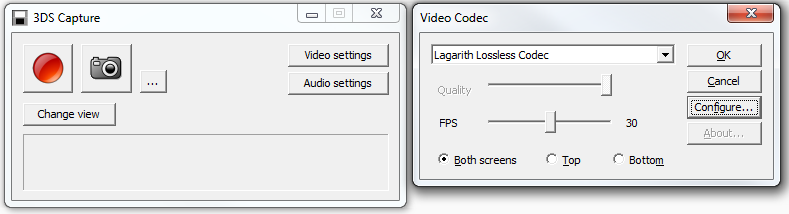
- lookbehindyou.png (29.76 KiB) Viewed 3821 times
Then make another recording.
I have never used After Effects, but does it look bad in preview mode only, or is it bad in the final rendering too?
Does it look better when you open the raw capture in your media player and go into fullscreen mode?
If the problem still persists, please post a sample capture (just a few seconds, post it as an attachment here, do not upload it to youtube!) and a screenshot of how it looks in After Effects. Also post your encoding settings from After Effects.
Re: Recording issues
Posted: Thu Aug 08, 2013 5:36 pm
by beavermedia
raphael wrote:Did you select the codec in the capture software? It should look like this:
lookbehindyou.png
Then make another recording.
I have never used After Effects, but does it look bad in preview mode only, or is it bad in the final rendering too?
Does it look better when you open the raw capture in your media player and go into fullscreen mode?
If the problem still persists, please post a sample capture (just a few seconds, post it as an attachment here, do not upload it to youtube!) and a screenshot of how it looks in After Effects. Also post your encoding settings from After Effects.
Thanks I managed to fix it, I usually composite things on my mac and when i've been working on my after effects on p.c i realised that the preview was set to half. Sorry about that but hopefully this thread will help out any one else with capturing problems.