NDS audio comes out finicky in recordings.
Re: NDS audio comes out finicky in recordings.
Why not use the headphone jack and your PC's line in for audio instead if the speakers are A-OK?
Re: NDS audio comes out finicky in recordings.
Are you using a ground loop isolator? https://ebay.to/3heZxWIDoubleRaven wrote: ↑Sun Jul 19, 2020 6:31 pmFigured I'd bump again. Audio sounds really compressed and distorted on any game when hooked up to computer. Works normal coming out of DS speakers and when I have headphones plugged into the DS. It's just when I try to capture the audio on computer it sounds super distorted and compressed.

Re: NDS audio comes out finicky in recordings.
Check your mic / line in settings.
-
Jakstalgia
- Posts: 2
- Joined: Mon Jul 20, 2020 5:36 pm
Re: NDS audio comes out finicky in recordings.
-
DoubleRaven
- Posts: 16
- Joined: Sun May 03, 2020 6:18 pm
Re: NDS audio comes out finicky in recordings.
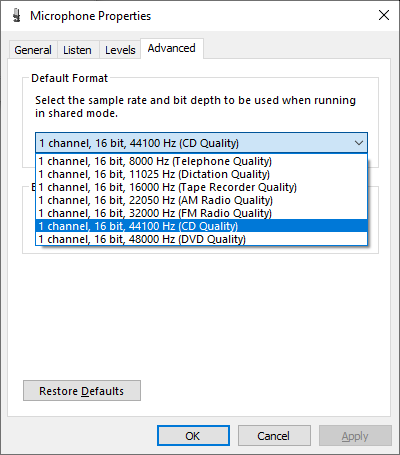
I may have found the cause of issue, my computer's in-line microphone only has 2 channel settings for some reason (2 channel, 16 bit, 44100 Hz (CD Quality) or 44800 HZ (DVD Quality)) . Anyone know how I can add 1 channel settings? That'll probably fix it. Sorry it took me so long to respond, I was away from home for the week.
-
DoubleRaven
- Posts: 16
- Joined: Sun May 03, 2020 6:18 pm
Re: NDS audio comes out finicky in recordings.
For the record, my laptop has only 1 audio jack which is both an in and out, and it is in my device manager as "Realtek High Definition Audio."
-
DoubleRaven
- Posts: 16
- Joined: Sun May 03, 2020 6:18 pm
Re: NDS audio comes out finicky in recordings.
Bump, still only have 2 channel options. Can't seem to find any way to make it 1 channel. Any adivce?
- Attachments
-
- Capture.PNG (14.83 KiB) Viewed 2883 times
Re: NDS audio comes out finicky in recordings.
It's the sample rate that matters here, not channels. If it's doing 44kHz by default then that isn't the problem.
-
DoubleRaven
- Posts: 16
- Joined: Sun May 03, 2020 6:18 pm
Re: NDS audio comes out finicky in recordings.
Interesting... it must be something to do with my computer I suppose, because the audio jack itself works fine, I plug my headphones into the DS and the sound comes through perfectly. When I plug it into my computer though, if I can get a reaction at all, the audio on the DS often just comes out distorted/compressed at seemingly sporadic intervals. I've tried multiple cables as well, so that doesn't seem to be the issue.
-
DoubleRaven
- Posts: 16
- Joined: Sun May 03, 2020 6:18 pm
Re: NDS audio comes out finicky in recordings.
Okay I'm surprised at myself, I actually figured it out. Turns out, it's cuz of this program on my computer called Sonic Studio. It was messing with audio input in the background, and after I disabled it, everything is coming in crystal clear. Radical.