Hey,
I downloaded everything the page said to download, I've been on the forums all day figuring this out, went out to buy a double male to male ended jack, did that, recorded horrible audio to the point that I couldn't listen to it. I don't understand though, the micro USB should be recording the audio and video like others. I can hear the audio out of my speakers, and the visual is crispy, but as soon as I record, nothing, and the audio is horrible (kind of hurts the ears) with the male to male. I switched everything around on the sound options. I'm very familiar with the computer, but I just can't figure out why the audio isn't functioning, and it's kind of frustrating because I have been trying to record videos since yesterday and I've come up with videos with no audio, terrible audio, and just wasted time.
Thanks,
Jim
No Audio... at all

Re: No Audio... at all
What Windows version?
What options do you have under Audio Settings?
Are you using a generic Windows sound card driver or OEM?
What options do you have under Audio Settings?
Are you using a generic Windows sound card driver or OEM?
-
shutupnrock8
- Posts: 7
- Joined: Fri Apr 25, 2014 1:03 am
Re: No Audio... at all
I'm using Windows 7 Ultimate, the only option that allows me to choose under the audio setting is my Corsair USB headset with just the micro USB in the 3DS. When I put the double male end jack in, I switched the audio settings over to the microphone input, and I changed my default settings to the microphone on my sound settings panel. I got sound, but it was terrible, like metal grinding on metal. I dont know what you mean by sound card, I built my own computer, I have the following parts (I can give model #'s if needed):loopy wrote:What Windows version?
What options do you have under Audio Settings?
Are you using a generic Windows sound card driver or OEM?
- ASUS Mobo
ASUS Nvidia 660Ti GTX (GPU)
Corsair 850W (PSU)
Intel 3.4 GHz - Haswell (CPU)
Corsair Vengeance RAM
And much more that really doesn't have any bearing on the sound quality.
Re: No Audio... at all
Find the audio drivers for your motherboard and install them.
Have you use XSplit on that computer before? There's a thread here about XSplit removing audio inputs when it's uninstalled.
Have you use XSplit on that computer before? There's a thread here about XSplit removing audio inputs when it's uninstalled.
-
shutupnrock8
- Posts: 7
- Joined: Fri Apr 25, 2014 1:03 am
Re: No Audio... at all
I believe I installed all of the necessary drivers for my mobo when I built it, I can double check if I haven't, and I can un-install and re-install them if I have. I've never heard of XSplit before. Should I download it? Is it harmful to my PC?loopy wrote:Find the audio drivers for your motherboard and install them.
Have you use XSplit on that computer before? There's a thread here about XSplit removing audio inputs when it's uninstalled.
Re: No Audio... at all
No, you don't need it. I asked because it was causing problems for other people.shutupnrock8 wrote:I've never heard of XSplit before. Should I download it? Is it harmful to my PC?
-
shutupnrock8
- Posts: 7
- Joined: Fri Apr 25, 2014 1:03 am
Re: No Audio... at all
I will definitely check my computer as soon as I get home from which isn't going to be for another 8 hours, but if it's not XSplit, what else do you think it could be? Thank you for your time by the way; I just want to get this all figured out, I've been wanting to record for the past 3 days now, I'm getting antsyloopy wrote:No, you don't need it. I asked because it was causing problems for other people.shutupnrock8 wrote:I've never heard of XSplit before. Should I download it? Is it harmful to my PC?
 .
-
shutupnrock8
- Posts: 7
- Joined: Fri Apr 25, 2014 1:03 am
Re: No Audio... at all
So, is there anyone that could possibly help me?
Re: No Audio... at all
What recording devices are available in the control panel?
If they're disabled, enable them. Some might be hidden, right click in the window to show them.
Were you able to find an audio driver for your motherboard?
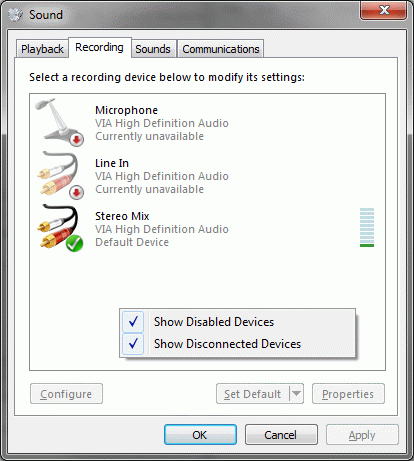
If they're disabled, enable them. Some might be hidden, right click in the window to show them.
Were you able to find an audio driver for your motherboard?