Not Capturing
Not Capturing
OK, so my 3DS just came back to me, installed the drivers, downloaded the software, plugged it in and its not capturing. Computer recognizes it as 3DS Capture so it's definitely detecting it just fine. There anything else I can try or did it probably get jarred loose while shipping?
Re: Not Capturing
OK, found out about the debug console and this is what I'm getting
- Attachments
-
- Screenshot_1.png (62.21 KiB) Viewed 2862 times

Re: Not Capturing
Hrm.. that is disappointing. 
I test everything before before sending it out, maybe something got knocked loose during shipping? You could try opening it up and reconnecting the board, see if that helps at all.
I test everything before before sending it out, maybe something got knocked loose during shipping? You could try opening it up and reconnecting the board, see if that helps at all.
Re: Not Capturing
I'll open it up and take a look quick, though while I'm doing that, is that something I can do without a soldering kit? Because I have neither the tools or knowledge to manage that... if its just something I need to fasten in place then not a problem, I can do that much with hardware.
Re: Not Capturing
What size screwdriver you use? I'm not sure I'm going to be able to get these off without stripping them.
Re: Not Capturing
#000 Phillips screwdriver is best, but whatever you have that can get it open.
There's no soldering. There's one cable that goes to the board, just disconnect and reconnect it. There's a little black tab on the connector you have to flip up to unlock it (be careful with it, it's kinda fragile).
http://3dscapture.com/install/15.jpg
http://3dscapture.com/tmp/fpc.jpg
If you'd rather not mess with it, that's fine.. I can take a look at it for you.
There's no soldering. There's one cable that goes to the board, just disconnect and reconnect it. There's a little black tab on the connector you have to flip up to unlock it (be careful with it, it's kinda fragile).
http://3dscapture.com/install/15.jpg

http://3dscapture.com/tmp/fpc.jpg
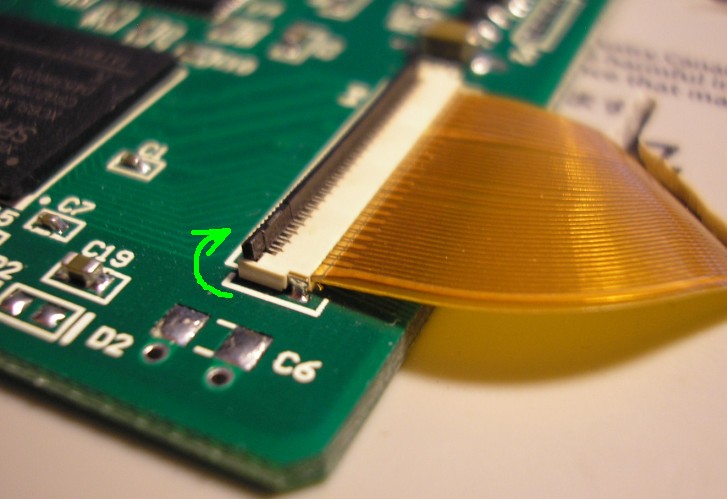
If you'd rather not mess with it, that's fine.. I can take a look at it for you.
Re: Not Capturing
Well that explains why I was having issues, smallest I have is a #0, going to see if I can get one quick. There's no software or driver issues that could cause the problem though that I could try for troubleshooting? 64 bit Windows 7 is my OS
Re: Not Capturing
If your computer recognizes the board and you don't see any errors in Device Manager, it's not a software problem.
Re: Not Capturing
Finally found a 000, opening it up and been fiddling with that connection a bit, so far no luck though... Suppose I'll just have to send it back on Monday unless you have any other ideas.
Re: Not Capturing
Just got back from sending it to you. Included a note, but will PM the info to you just to be safe.